Module · Services for residents and businesses
Civil registry and population records
Identity documents, appointments, transcriptions, certificates and operational registers.
The module digitises the work of the civil registry and population records service: the applications and documents specific to it, the transcription of civil status records, online appointments for an identity document and for marriage, the management of offices and counters, and the service's operational registers.
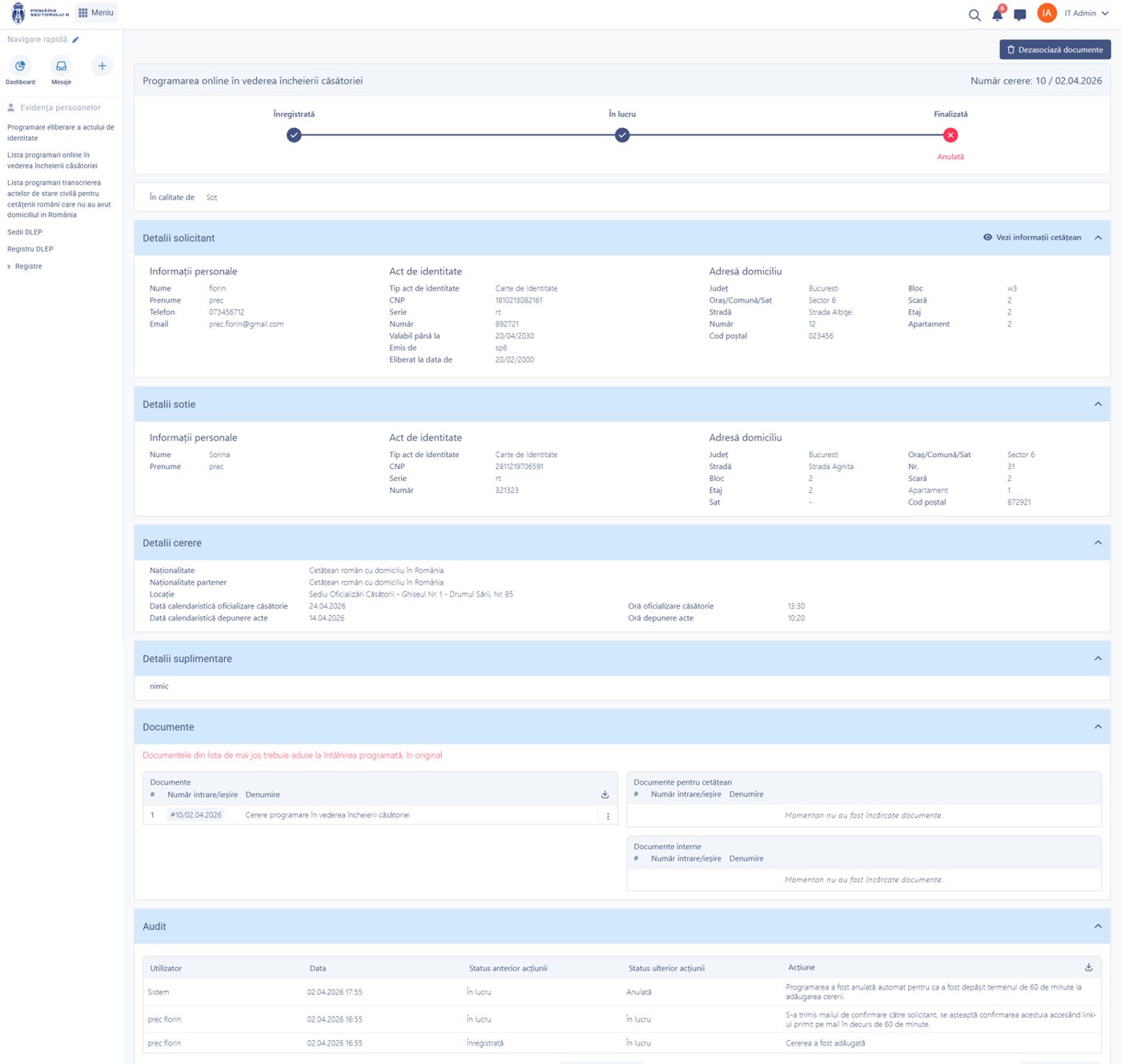
Appointment detail: applicant and partner data, attached documents and audit log.
What changes in the civil registry service
Appointments no longer overlap and are no longer kept in a notebook; every couple receives its confirmation automatically, and the service has a complete record of the transcriptions and of the certificates issued.
What you can do
Online appointments, civil status applications, issuing certificates and managing offices and counters.
Identity document appointment
An online workflow in three steps, with automatic confirmation to the applicant.
Marriage appointment
The details of both partners, the office, the registrar and the time slot, with automatic calculation of the date for submitting the documents.
Transcriptions
Applications to transcribe civil status records for nationals who have not been resident in the country, with the people associated with the application.
Blocking of slots
Reserved slots are blocked automatically, so the same slot cannot be taken by two applicants.
Offices and counters
Opening hours by day, time slots, blocking of days and deactivation of counters.
Certificates and documents
Issued with the generated document and the signed document managed separately.
Operational registers
Temporary ID card records, operational entries, inspection register, suggestions and complaints book, administrative change of name.
Configurable services
Eligibility conditions, required documents, deadlines, workflow steps and templates, per service, with no change to the source code.
See all features
- Submission at the counter and from the citizen portal, with a single workflow for checking, drafting and signing
- An automatic workflow for the resident to confirm or cancel the appointment, with the status updated
- Rescheduling and completion of the application directly from the internal interface, with the notice regenerated
- Documents attached to the appointment, in three categories: from the resident, for the resident and internal
- Advanced search by national ID number, date range, status and locality
- The daily planning chart for the service's activity
- Reports on appointments registered, completed, rejected, expired and cancelled, with export to Excel
How it works
From the online or counter application to the certificate issued and entered in the register.
ApplicationBirth, marriage, death or transcription
DocumentsThe supporting records, by category
CheckValidation and internal approval
AppointmentOffice, counter and reserved time slot
RegistrationEntry in the corresponding register
IssueThe certificate issued and communicated
What you get as standard
The module is not just an interface. It comes configured in its standard version, ready to use from day one.
- forms
- workflows
- registers
- reference data
- document templates
- business rules
- validations
- notifications
- reports
- dashboards
- access rights
- audit
Native integrations
The service uses the same identification data and the same components as the rest of the platform.
Part of the same platform
Civil registry and population records is not a separate application. It uses the same records registry, the same documents and the same signing, notification and audit mechanisms as every other module.
How you can start
You do not have to digitise the whole institution at once.
START ONE
You start with this module directly: Civil registry and population records, the internal portal and the tools it needs to run.
START PRO + CIVIL REGISTRY
If you already have the digital foundation — records registry, documents, workflows — the module is activated on top of it, with no migration.
Want to see how Civil registry and population records would work in your administration?
We take you through the complete workflow on a real case, from the online appointment to the certificate issued and entered in the register.